
By -
Darren Straight
Windows Live Mail M7 Preview
The New Windows Live Mail M7 release is almost here, but what can we expect?
Well heres some info from the Windows Live Mail Team Blog
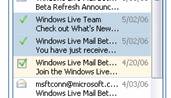
Checkboxes
- You will now be able to select messages the same way you used to in Hotmail. But don’t worry the option to select multiple messages using the shift-click or control-click will still be available to use, so you can either use checkboxes or the new way.
Better Signing in to Windows Live Mail.
- The Set-up wizard for first time users using Windows Live Mail is now easier to use
- New loading page with a link to try the basic version if your connection is too slow.
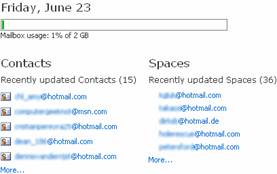
- The Today page will now have your storage meter, updated contacts, and updated Spaces for quicker access too.
- Search structured query syntax now makes it easier for you to find messages. As you will now be able to search with the following fields: cc:, to:, from:, replyto:, body:, and folder:.
Composing messages is a richer more customized experience.
- The Photo upload tool is back just like in Hotmail
- Rich text signatures are now available so you can add fonts, colors, and emoticons, this option will be available in Options > Mail and Junk E-mail.
- You will now be able to turn off the spell checker from the compose page

Windows Live Mail is now available to more people.
- The Live Mail Beta is now being used by some 6 million users!
- 12 New languages are now available: Korean, Dutch, Norwegian, Swedish, Traditional Chinese, Danish, Finnish, Thai, Turkish, Greek, Hungarian, and Polish.
- The basic version now has: shortcut for calendar, next/previous message buttons, editable contacts, and a toolbar at the bottom of each message
You can take your contacts with you and find them easily.
- A new contact importer will let you import contacts from Outlook and Outlook Express, you will be able to download from the Customize menu.
- A Print button will be available on the contact page so you can print your entire contact address book.
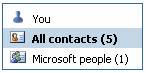
- Share your contact information with friends on the “You” contact on contacts page.
- Improved search box now searches full contact name, address, and primary phone number.
Windows Live Mail Team Blog
Windows Live Mail Desktop Team Blog
4 thoughts on “Windows Live Mail M7 Preview”
Randy July 18, 2006 at 6:08 am
You actually use Windows Live Mail? I find the interface unbearable.
Ryan July 18, 2006 at 6:41 pm
To access the beta early login and goto this page:
http://by101w.bay101.mail.live.com
instead of your normal bay 😉
TheBizofKnowledge July 18, 2006 at 10:57 pm
I haven’t actually tried Windows Live Mail, but I’ve seen plenty of screenshots. I have to agree with Randy. It doesn’t look like something I’d be able to deal with on a daily basis. It’ll take a lot to get me away from Gmail!
Blog inspiré » Blog Archive » Windows Live mail M7 is live now… July 26, 2006 at 9:13 am
[…] you can know more features about this Windows live mail M7 from Darren Straight Blog […]